Connectivity cannot be assumed
A cloud-dependent architecture would make the application least reliable in the environments where it was most useful. Field operation had to come first, and synchronization second.

FMS connects operators straight to Bluetooth-enabled fuel-tank sensors from an iPhone — on-site readings, offline field monitoring, historical synchronization and multi-site visibility, without a dedicated cellular gateway for the core workflow.
Direct BLE sensor reads.
Offline by default.
A tank sits on a construction site, a farm, a remote yard. Bluetooth reaches it; the network often does not. The application treats the two as independent states rather than assuming both.
Follow a reading ↗Industrial IoT / fuel management
Bluetooth-first tank monitoring platform
Native iOS engineering and BLE integration
Fuel tanks sit on construction sites, farms, remote storage areas, generator installations and industrial yards. Those are precisely the places where internet access cannot be assumed.
Manual inspection fills the gap: readings become outdated quickly, supervisors have limited remote visibility, low-fuel conditions may not be detected early, historical consumption is difficult to reconstruct, and multiple sites become difficult to coordinate.
Traditional telemetry solves this, but it introduces hardware, installation, gateway, cellular connectivity and recurring infrastructure costs before the first reading arrives.
A cloud-dependent architecture would make the application least reliable in the environments where it was most useful. Field operation had to come first, and synchronization second.
Large metal tanks and industrial enclosures affect signal behaviour, range and connection stability. Office conditions do not represent the field, so the application needed controlled connection states, retries, timeouts and clear failure handling.
Reading a nearby sensor is useful. Managing dozens of tanks across several locations is a different product problem — individual measurements have to become shared operational information.
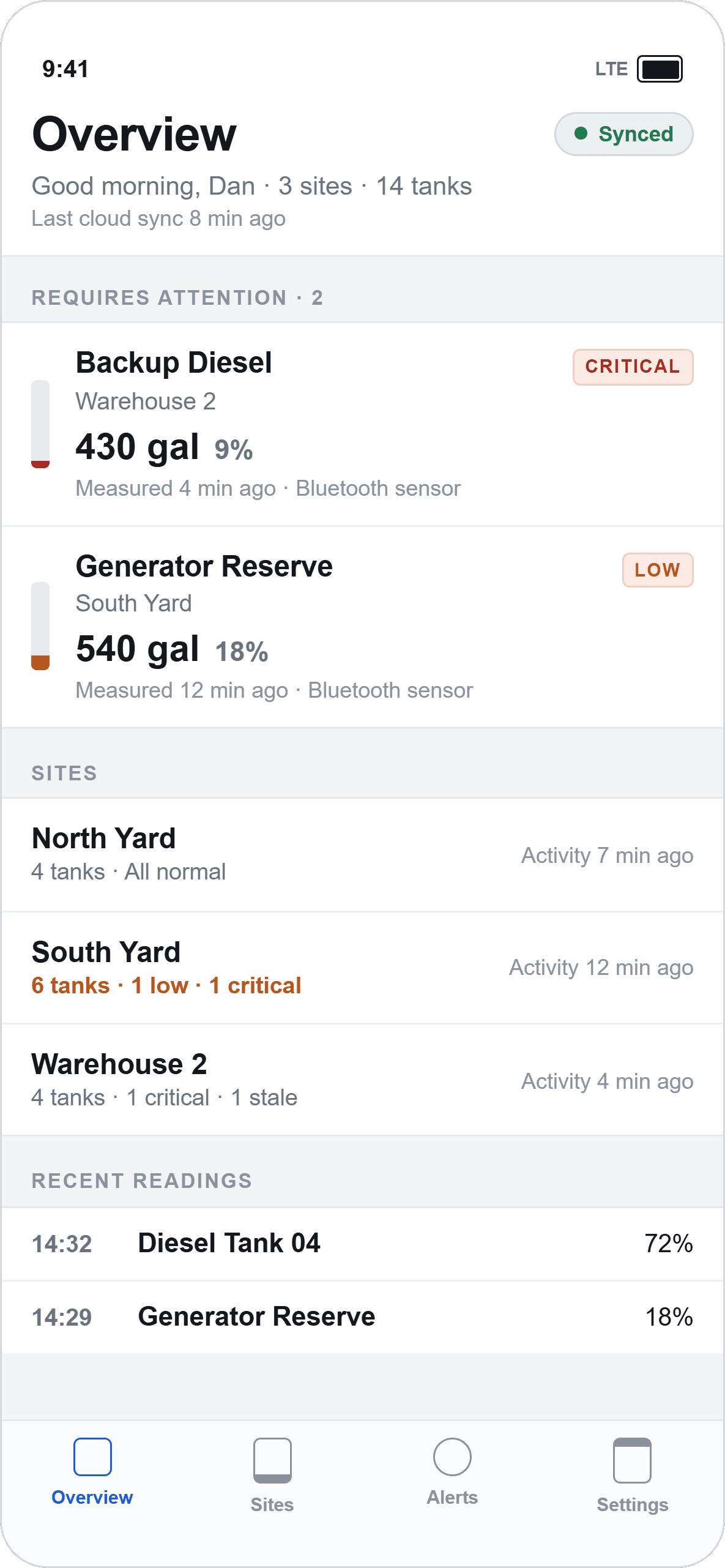
Four views of the delivered application.
Each shows another step from a sensor in the field to a figure an operations team can act on.
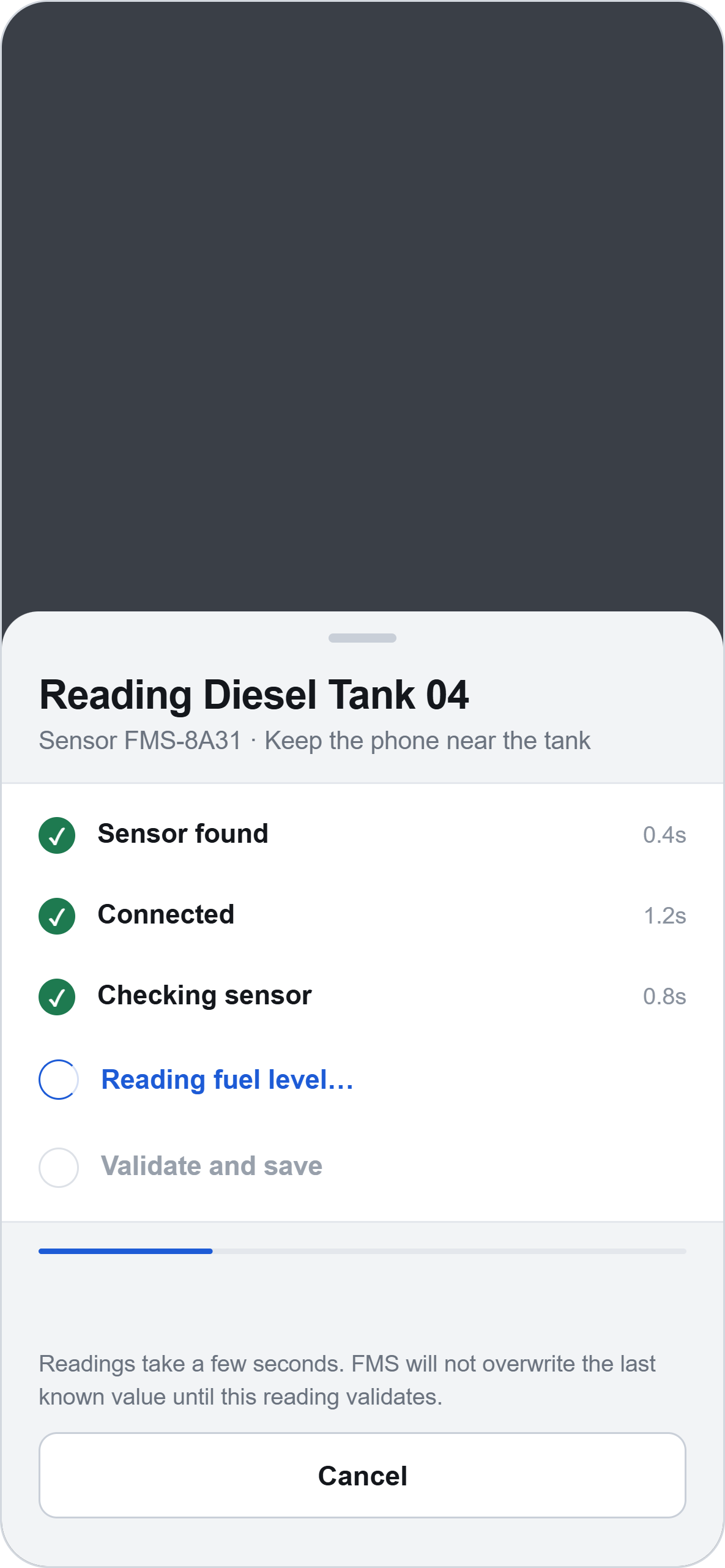
CoreBluetooth discovers compatible sensors nearby and connects directly from the iPhone. Operators do not need a separate field gateway simply to inspect a tank they are standing next to.
Discover→Connect→Read→Validate→Store locally→Synchronize→Share
The architecture treats the two as independent states. The field workflow — discover, connect, read, validate, store, display — completes entirely on the device. Cloud synchronization is a second, separate path that runs when connectivity allows.
That separation is what makes the product trustworthy in the environments it was built for. An operator standing at a tank gets an answer regardless of what the network is doing.
Look under the hood ↘Discovery, connection, measurement, validation, conversion and local storage all happen without a server in the path.
The measurement is stored locally and pushed to the backend, joining the tank's history and becoming visible to the wider team.
The measurement is kept locally as pending. The interface exposes data freshness rather than presenting a cached figure as though it were current.
When connectivity returns, stored readings move to the backend for historical storage and shared visibility. Nothing in the field workflow waits on it.
Bluetooth specifics live behind a sensor adapter, so tank business logic never depends on one vendor's GATT layout — and a new sensor type does not reach into the domain code.
Bluetooth is the product, not a feature bolted onto one — so the stack is deliberately compact: a native iOS application talking to sensors directly, and a thin REST layer carrying readings onward when it can.

A native iOS application, chosen because hardware communication is the product's primary capability rather than a peripheral feature.
For an iOS-only sensor product, native development gives stronger control than wrapping hardware communication in a cross-platform abstraction.

Direct access to BLE scanning, connection lifecycle, service discovery, GATT characteristics, authorization states and reconnect behaviour.
Field conditions demand explicit control of connection states, retries and timeouts. Industrial enclosures make Bluetooth behave in ways a convenience wrapper hides.
Discovery, filtering, connection, GATT service discovery, characteristic reads and payload decoding, with sensor-specific detail isolated behind adapters.
CoreBluetooth is not tank business logic. Keeping vendor detail behind an adapter means supporting new hardware without touching the domain.

Batch reading ingestion, tank and site retrieval, threshold updates and history — the path that turns a local measurement into shared visibility.
Field devices accumulate readings offline. Sending them as a batch when connectivity returns suits the actual usage pattern better than per-reading calls.

Tank configuration, latest readings and pending measurements held locally under iOS Data Protection, with credentials in the Keychain.
Because the workflow has to complete without a server. Local state is what makes the last-known reading available when nothing else is.
Modular feature boundaries, a sensor abstraction layer, tank domain services and repository-based persistence, layered from UI down to CoreBluetooth.
Offline-first means reconciling local and remote state. Explicit boundaries keep that reconciliation in one place instead of spreading it through the UI.
The shipped product is a native iOS application with a thin REST synchronization layer. The source also describes a proposed AWS evolution path for larger deployments; those services are an architectural direction rather than part of the delivered backend, and are not claimed here.
Technology names identify the documented implementation, not partnerships or endorsements.
Bring one monitoring workflow that depends on someone walking up to the equipment. In 30 minutes, we will map what the sensor can tell you directly, what has to survive a lost connection, and where a gateway is genuinely worth its cost.
30 minutes · Your sites, sensors and connectivity