Slow intake hides opportunity
Provider notifications must be acknowledged quickly even when OCR and AI processing take longer.

Inflow converts RFQs, POs, quotes, and invoices into structured CRM opportunities—while keeping every uncertain field and customer reply under human control.
AI sales inbox automation.
Human-governed CRM workflows.

Document type, confidence, amount, deadline, and next action stay visible.
Follow the workflow ↗B2B sales operations
AI-native CRM + AWS pipeline
Product, AI, cloud & security
Sales teams live in shared inboxes, but the CRM still waits for someone to notice, interpret, and re-enter what arrived.
RFQs, purchase orders, quotes, and invoices come through email bodies, native PDFs, scans, images, and vendor-specific templates. A missed deadline or incorrectly keyed price can become a lost deal or damaged relationship.
Inflow was designed to make the inbox an event source—not another disconnected place to work.
Provider notifications must be acknowledged quickly even when OCR and AI processing take longer.
Quantities, totals, currencies, and deadlines require deterministic validation and visible confidence.
Drafts are useful; autonomous customer email is a commercial risk that needs a technical boundary.
Explore the supplied product screens behind intake, review, approval, and audit.
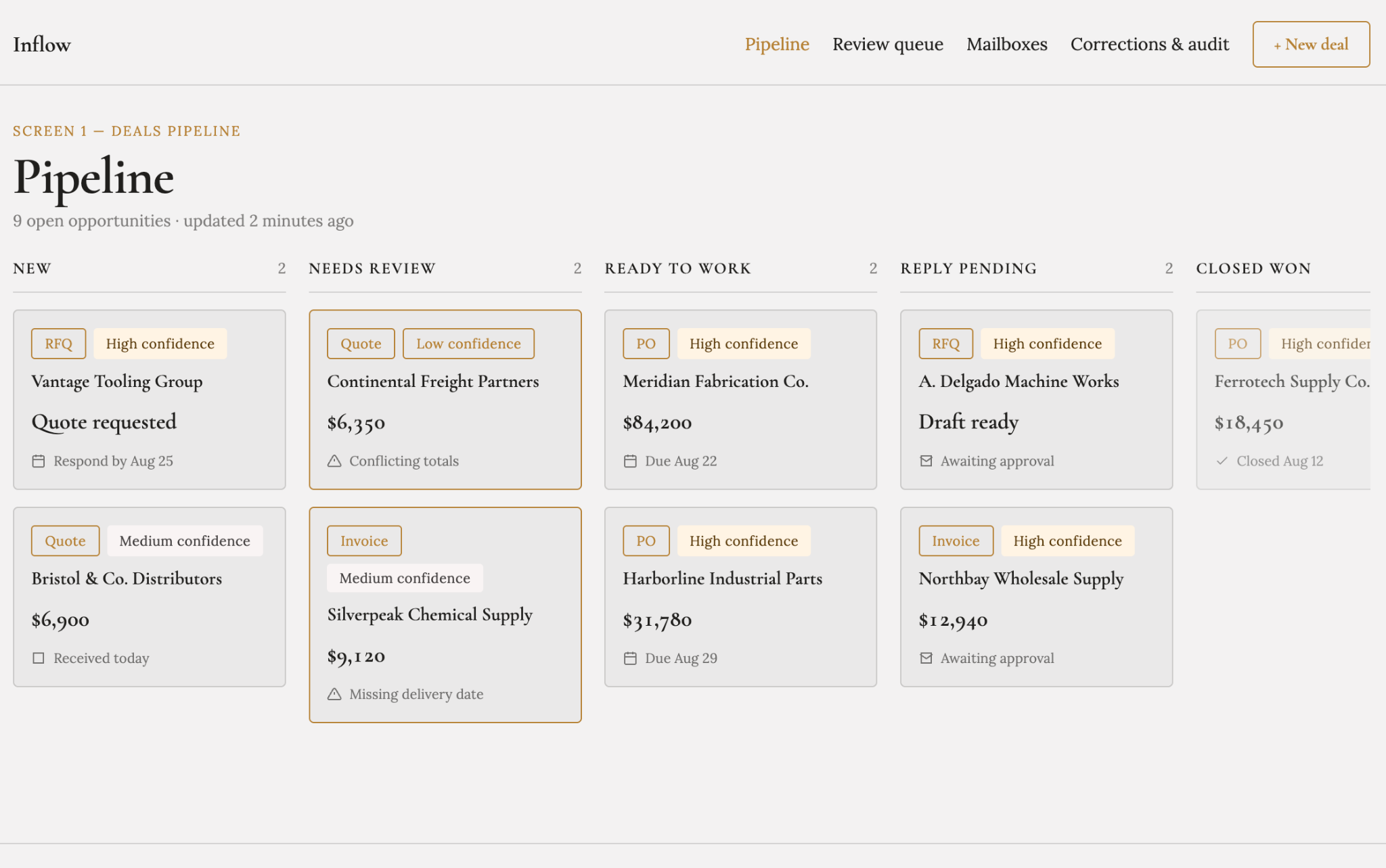
Every card carries document type, confidence, amount, deadline, and current state—so representatives can distinguish ready work from held exceptions.
Email event→Classify→OCR when needed→Extract→Validate→Review→Approve & send
Inflow does not treat every document—or every extracted field—as equally trustworthy. Automation depth is determined by structured validation and confidence.
Look under the hood ↘PO · Quote · Invoice · RFQ · Irrelevant
Schema valid, totals reconcile, required fields present.
No actionable opportunity is created automatically.
Highlight the fields a human needs to verify.
The model cannot transmit a customer email.
The AWS stack is organized around fast acknowledgement, durable work, replayable state, and an approval boundary that cannot be bypassed by model output.

Provider events move into durable queues and a visible document-processing state machine.
Managed retries, backpressure, dead-letter queues, and controlled replay replace persistent workers.
Bedrock classifies and extracts structured fields; Textract handles scanned pages, forms, and tables.
Irrelevant mail stops before expensive extraction, while difficult layouts take the appropriate OCR path.

Contacts, companies, deals, line items, corrections, approvals, and audits share a relational record.
The workflow requires transactions and traceable relationships across source documents and deals.
DynamoDB guards event identity and replay state; S3 retains encrypted raw messages and attachments.
Provider retries do not create duplicate deals, and records remain traceable to source material.

The CRM surfaces low-confidence fields, exceptions, and approval actions behind federated identity and MFA.
Review and send actions require an authenticated actor and role, not simply a visible UI button.
Logs, traces, pipeline metrics, alarms, and audit history make each document’s path observable.
Operators need to see retries, queue age, model failures, blocked sends, and subscription problems.
Managed services cover intake, processing, identity, encryption, monitoring, recovery, and cost governance.
Technology names identify the documented architecture, not partnerships or endorsements.
Bring one document-driven sales or supply-chain workflow. Let’s explore where automation can prepare the work—and where human control belongs.
30 minutes · Your workflow, constraints, and next step
30 minutes · Your workflow, constraints, and next step