Assessment capacity depended on staff
One observer had to watch, judge, and count one athlete for the duration of the set.

RepSense uses real-time pose estimation, joint-angle geometry, and a camera-normalization layer to count push-ups against a defined depth-and-lockout standard—without wearables, cloud video, or an observer tallying every repetition.
Pose-based assessment.
Private edge inference.
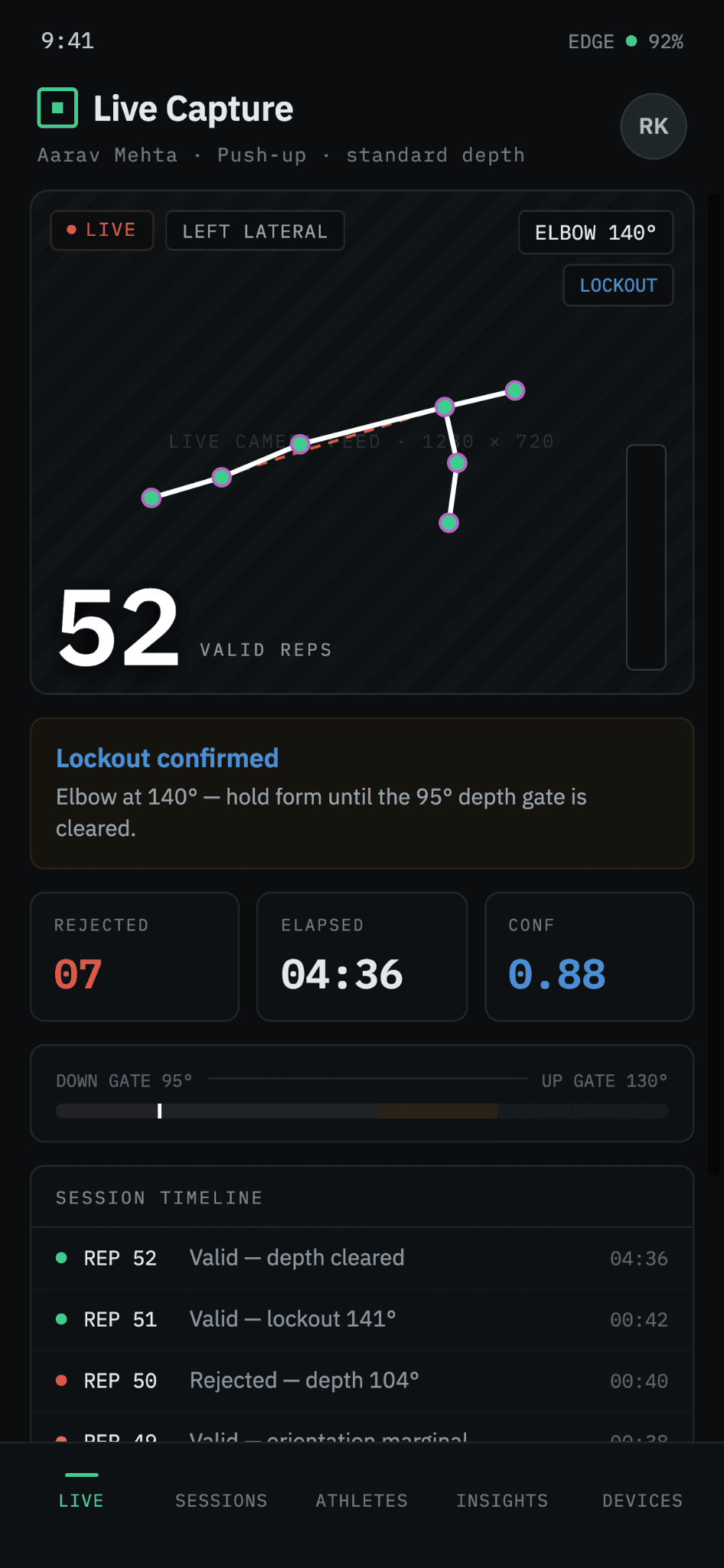
Live landmarks, elbow angle, gate state, rejection reasons, and rep history make the assessment inspectable.
Follow the measurement ↗Movement assessment
Camera-only rep counter
Computer vision & product engineering
Human assessors cost time, apply standards differently, and usually leave behind only a final number. Wearables may count motion, but they do not verify whether the movement met the required form.
A camera can observe the body directly. The difficulty is that raw landmark coordinates change when the camera moves—so a counter tuned to one angle often fails from another.
RepSense separates measurement from judgement: it re-projects the detected body into a canonical reference frame before any counting rule runs.
One observer had to watch, judge, and count one athlete for the duration of the set.
“Deep enough” remained a judgement instead of an explicit, repeatable geometric rule.
Raw image coordinates changed with angle, distance, tilt, and the side from which the athlete was filmed.
The supplied mobile concepts show how the analysis engine can become a usable assessment product for operators, coaches, and athletes.
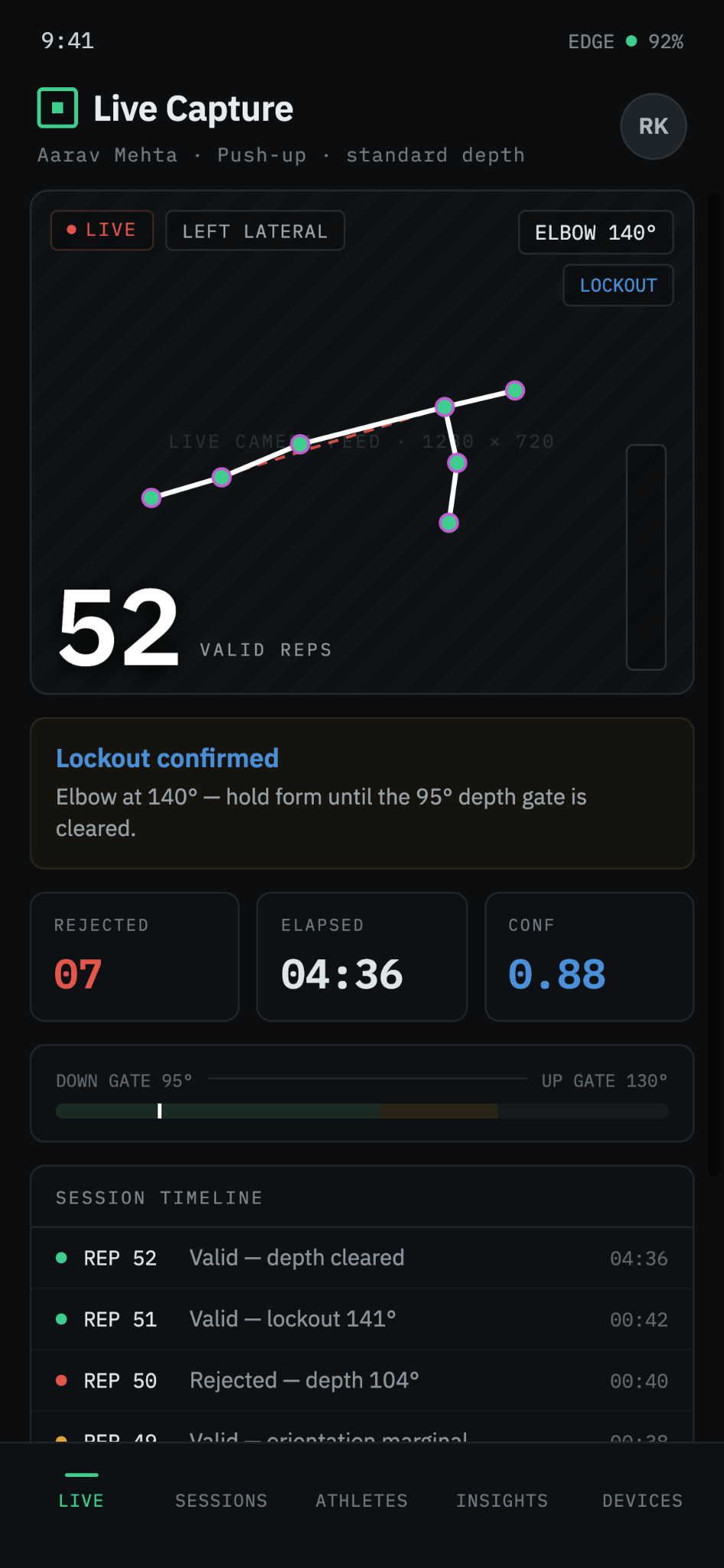
The live view exposes body landmarks, elbow angle, gate state, valid and rejected reps, confidence, and a rep-by-rep timeline.
Capture→Resize→Pose inference→Measure→Normalize→Gate→Render
The shoulder-to-ankle line becomes a reference axis. Landmarks are rotated, uniformly scaled, translated to a fixed anchor, and clamped inside the frame. Only then does the deterministic rep logic evaluate posture and elbow angle.
Look under the hood ↘YOLOv8n-Pose returns the body points required for measurement and orientation.
A bent arm alone is not enough; posture must also satisfy the normalized geometry rule.
A 35-degree dead band prevents jitter and double-counting around one threshold.
Only an angle above 130 degrees after a valid descent increments the count.
Show skeleton, normalized geometry, angle, progress, count, and rejection reason.
The same parameterized pipeline serves left, right, and front-facing footage. Landmark sets, skeleton connections, anchors, and reference points change as inputs—not as copied implementations.
The focused stack keeps capture, inference, geometry, decision, and rendering inside one local process—reducing latency, dependencies, and privacy exposure.

Session control, geometry, state transitions, and rendering orchestration live in one readable runtime.
It provides the strongest route from vision research to a maintainable real-time application.

Capture, resizing, overlays, display, and kiosk keyboard controls stay in the same frame loop.
No cloud round-trip sits between movement and feedback, and no footage needs to leave the device.

The compact model estimates seventeen anatomical landmarks under a confidence floor.
The assessment needs a small set of reliable joints, making latency and ordinary-hardware execution the better trade.

Normalized vectors, dot products, rotation, scaling, and clamping turn landmarks into stable measurements.
The system can explain exactly which measurement and threshold produced every count.
Frames, landmarks, decisions, and overlays stay on the machine attached to the camera.
It removes network dependency from the loop and avoids transmitting sensitive footage.
Ordered down-then-up transitions replace the fragile single-threshold counter.
The dead band suppresses landmark jitter and prevents hovering near one value from inflating results.
Standardize each frame to a known working space.
Confidence-filter the detected human pose.
Re-project the body onto a canonical reference axis.
Evaluate objective rules through an ordered state machine.
Render landmarks, angle, state, progress, and total.
Product screens are supplied interface concepts. The verified build is a focused single-process analysis engine. No accuracy percentage, FPS, latency, deployment, user count, or clinical validation is claimed.
The existing build counts one subject, does not persist sessions, and is not positioned as production-ready or clinically validated. Operational hardening would add detection-gap handling, multi-person tracking, pinned packaging, regression tests, telemetry, and externalized configuration before unattended deployment.
Technology names identify the documented implementation, not partnerships or endorsements.
Bring one movement, inspection, measurement, or edge-inference workflow. In 30 minutes, we’ll map the geometry, failure modes, privacy boundary, and a practical engineering next step.
30 minutes · Your use case, constraints, and next step
30 minutes · Your use case, constraints, and next step