Support knowledge was scattered
Useful answers lived across file formats, docs, and product references rather than one customer-queryable surface.
Suprix turns every customer organization’s documents into its own isolated AI support brain, then connects that knowledge to an embeddable website widget, voice support, and a human operator workflow when automation should step back.
Multi-tenant RAG.
Widget and voice support.

When coverage is thin, the conversation keeps its messages, customer context, and lifecycle state for a human operator.
Follow the handoff ↗B2B customer support
Multi-tenant AI support platform
RAG, product & full-stack engineering
Most support teams already have the answer somewhere: product docs, PDFs, policies, pricing sheets, onboarding notes, SDK guides, images, or previous support material.
The hard part is making that knowledge safely available at the exact moment a customer asks—without letting AI invent an answer when the organization’s own material is silent.
Suprix solves the problem as an operating system for support automation: tenant-isolated knowledge, grounded responses, real-time conversations, and human escalation inside one workflow.
Useful answers lived across file formats, docs, and product references rather than one customer-queryable surface.
Pricing, policy, deployment, and support answers needed to come from approved organization material.
Operators needed the full conversation, customer profile, device data, language, and unresolved status.
The product combines an authenticated operator dashboard, a knowledge-management surface, an embeddable widget, and optional voice support—so customer interactions do not fragment across separate tools.
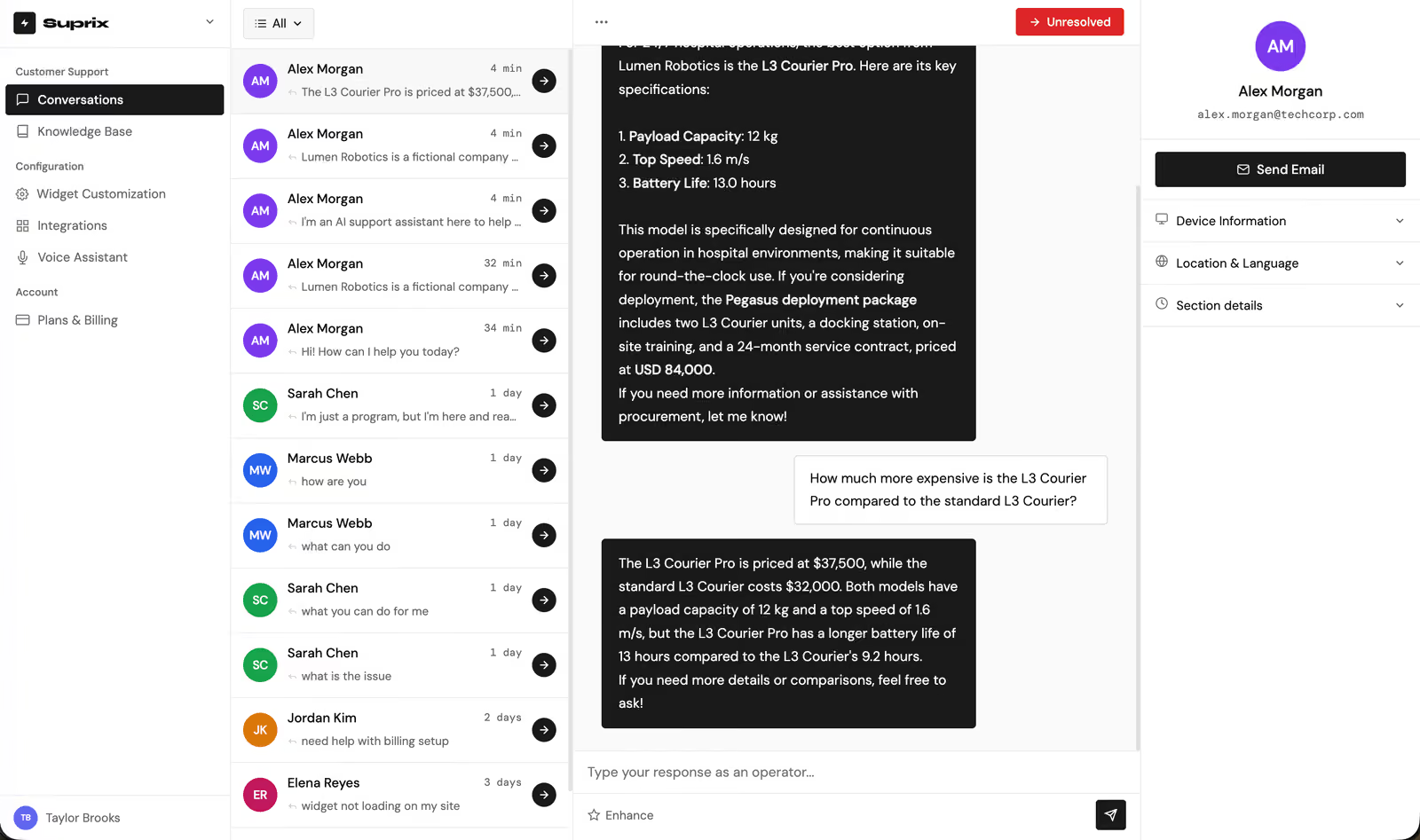
The inbox shows AI-assisted conversations beside customer context, status, and escalation controls. Operators can reply, enhance drafts, and resolve only when the interaction is genuinely handled.
Website visitor→Widget session→Organization RAG search→Grounded reply→Escalation if needed→Operator resolution
Suprix isolates knowledge at the organization namespace level before retrieval happens. That means the AI does not search a global pile of passages and filter later—it starts inside the right organization’s approved material.
Look under the hood ↘Admins upload support docs, SDK material, product catalogs, policy files, images, HTML, and text content.
Visitors ask questions through a lightweight chat surface installed on the business website.
Support teams review unresolved conversations, customer context, and AI-generated drafts.
The AI retrieves within the customer organization’s namespace and uses that context to generate a grounded reply.
If coverage is missing or the customer asks for a person, the entire interaction moves into operator workflow.
Every surface uses the same conversation record, organization scope, and customer context.
Suprix is designed to answer documented questions, capture context, and escalate unresolved cases. The product value comes from combining AI speed with operator governance.
The implementation keeps product state, identity, knowledge retrieval, widget delivery, voice integration, and human workflow as separate concerns—so the platform can scale without mixing customer data or support responsibilities.

Powers the operator dashboard, configuration screens, and customer-facing widget experience.
One component system can serve admin, support, and embedded surfaces while keeping each experience tailored.

Stores conversations, messages, widget configuration, organization-scoped data, and real-time updates.
The customer widget and operator dashboard need the same conversation state without fragile polling.

Supports retrieval-aware response generation and operator draft enhancement.
The model’s role is to compose from approved retrieved context, not replace the organization’s source of truth.

Separates authenticated organization members from anonymous or lightweight customer sessions.
Operators need authenticated access; website visitors need low-friction support entry.

Adds AI voice-call capability as a configurable support channel.
Voice support becomes another governed support path rather than a separate, untracked assistant.

Keeps third-party credentials and integration configuration outside application code.
Support channels, AI providers, and voice integrations need managed credentials with clear operational boundaries.
Admins add organization-owned documents, catalogs, HTML, images, PDFs, and text.
Content is prepared for retrieval inside the owning organization’s namespace.
A small script initializes the support interface on the customer’s website.
The AI uses retrieved passages to produce customer-facing support answers.
Operators receive unresolved cases with customer context and conversation history.
The supplied screenshots show the operator inbox, knowledge base, Vapi configuration, and widget states. Production metrics depend on each customer’s documents, usage volume, escalation policy, and quality review process.
Suprix should not invent policy, pricing, procurement, or product answers when organization knowledge is missing. The safe behavior is to ask for clarification or move the conversation to a human operator.
Technology names identify the documented implementation, not partnerships or endorsements.
The strongest part of Suprix is not the chat bubble. It is the operating model behind it: organization-owned knowledge, controlled retrieval, real-time conversation state, and a fallback path that respects the limits of automation.
That makes the platform valuable for SaaS teams, product-led companies, procurement-heavy support desks, and any business where customer answers must match the current approved material.
Multi-format ingestion · organization-scoped retrieval
Website widget · chat · optional AI voice calls
Operator inbox · context panel · lifecycle status
Fallback · escalation · human resolution
Responses are grounded in organization material before they are customer-facing.
Knowledge access is scoped to the owning organization’s namespace and configuration.
Escalation includes the conversation, customer identity, device context, and unresolved status.
A simple script-based install keeps deployment friction low for customer websites.
Bring one support workflow, product catalog, or customer-facing knowledge base. In 30 minutes, we’ll map the tenant boundary, retrieval policy, widget experience, and escalation design.
30 minutes · Your support workflow, constraints, and next step
30 minutes · Your support workflow, constraints, and next step